GitHub

AI 探索笔记AI ExplorationsAI Explorations

一些 AI 模型的实测,和可以直接上手玩的 demo。每一个都是静态网页,点开就能玩。

Hands-on tests of AI models, with interactive demos you can play with right in the browser.

打开 demoOpen demo

图像编辑Image editing多视角Multi-view俯视图Top-down view对比Comparison

MiniMax H3-Image 实测:一张图转出四面和俯视,侧面比 Qwen Image 2.1 准MiniMax H3-Image — turns one photo into front, back, side and top views, and gets the sides right where Qwen Image 2.1 doesn't

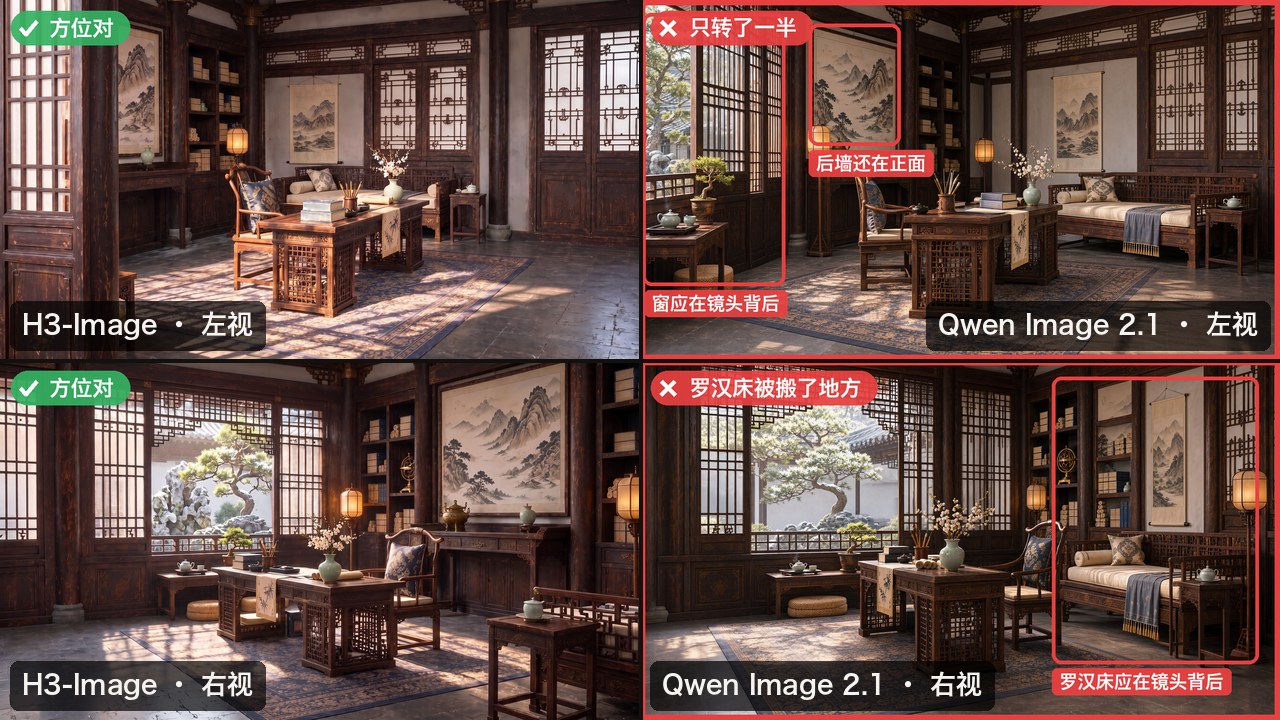
MiniMax 11 月开源的图像生成和编辑模型(H3 去掉音频分支,33B DiT,6 步)。只给一张古风书房图,和 Qwen Image 2.1 各生成前、后、左、右、垂直俯视 5 个视角,每个 3 个种子,由 Claude Opus 5.5 对照参考图逐张判定。H3-Image 平均 4.87 分、方位 15/15 全对,Qwen 4.13 分、10/15;俯视和后视两个都行,差距在侧面:Qwen 的左视 3 张都没转到位。H3 每张 13.5 秒,快 3.7 倍。

MiniMax's open image generation and editing model (H3 without the audio branch, a 33B DiT in 6 steps). Given a single photo of a classical Chinese study, it and Qwen Image 2.1 each rendered front, back, left, right and straight-down top views, 3 seeds each, judged image by image against the reference by Claude Opus 5.5. H3-Image averaged 4.87/5 with the layout right in 15 of 15; Qwen 4.13/5 and 10 of 15. Both handle the top and back views; the gap is the sides, where none of Qwen's three left views turned far enough. H3 takes 13.5 s per image, 3.7× faster. The page is in Chinese.

MiniMax-H3-Image (Comfy-Org int8)Qwen Image 2.1 (int8)Claude Opus 5.5 (judge)ComfyUI 0.45

要点Notes
  • 俯视:6 张全对,都画成平面图,桌上东西从左到右的顺序和原图一样。Top view: all 6 are proper floor plans, with the objects on the desk in the same left-to-right order as the photo.
  • 后视:6 张都真转了 180°,窗和罗汉床左右互换、椅子背对镜头、桌上东西顺序反过来;Qwen 有一张把后墙的书架和浑仪抄到了身后那面墙。Back view: all 6 really turn 180°: the window and the daybed swap sides, the chair faces away and the desk objects reverse order. One Qwen image copies the back wall's bookshelves and armillary sphere onto the wall behind the camera.
  • 左视是分水岭:H3 三张都对;Qwen 一张没换方向,两张只转了约 45°,还把书案原地转了 90°。The left view is the divide: H3 gets all three right; Qwen keeps the original direction once and turns only about 45° twice, rotating the desk 90° in place.
  • 右视:H3 三张全对;Qwen 两张对,一张把罗汉床整组搬到了后墙前。Right view: H3 gets all three; Qwen gets two, and one moves the whole daybed group to the back wall.
  • 和 P-H3-Image 那篇不同,这次 Qwen 的后视能真转过去;这次提示词写明了相机位置和哪些东西换边,可能是原因之一,没有单独验证。Unlike the P-H3-Image post, Qwen's back views really turn this time; the prompts here spell out where the camera stands and what swaps sides, which may be part of why (not tested separately).
打开 demoOpen demo

图像编辑Image editing多视角Multi-view俯视图Top-down view对比Comparison

P-H3-Image 实测:做俯视图不如 Qwen Image 2.1P-H3-Image — loses to Qwen Image 2.1 on top-down views, and neither can turn to the side

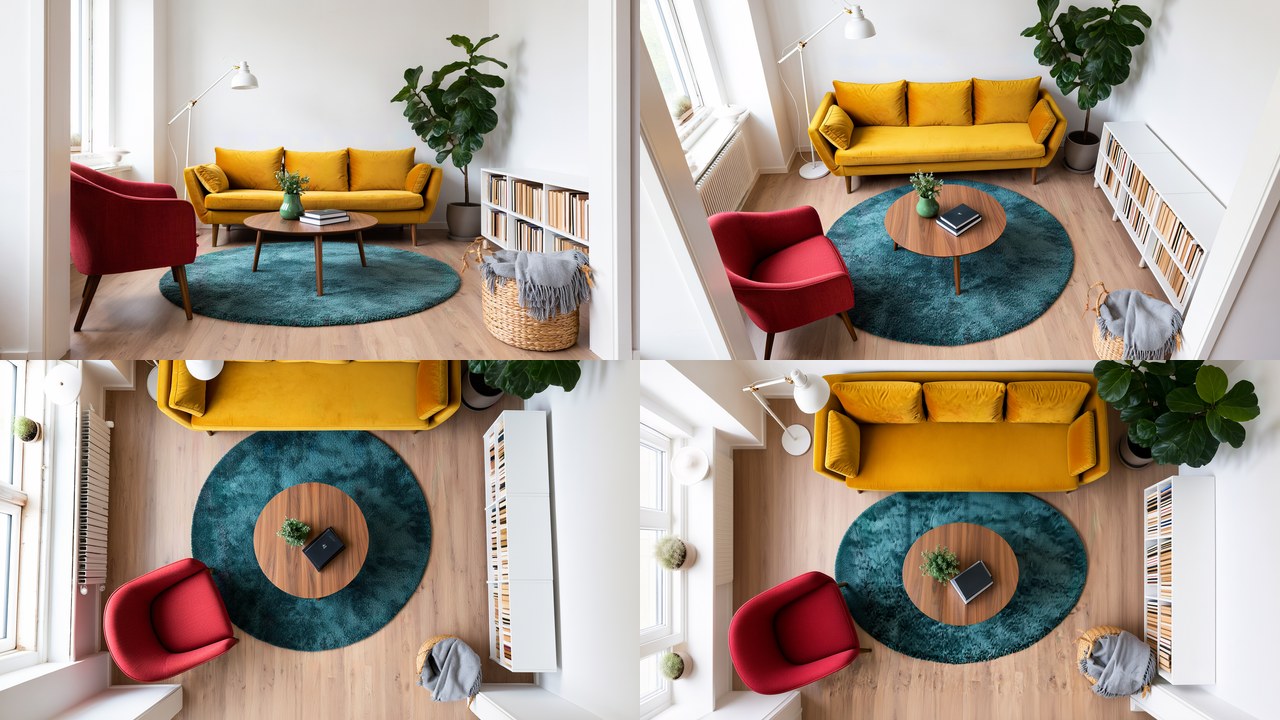
PrunaAI 基于 MiniMax-H3 做的图像生成和编辑模型,8 步出 8 MP。用 4 个自写场景(客厅、小镇广场、后院花园、动画卧室)测“同一个场景换视角”,重点是俯视图,和 Qwen Image 2.1 改图对比,由 Qwen3.8 看图评判。俯视图 P-H3 24 张里 10 张是正上方,Qwen Image 24 张全部至少是陡俯视,两两盲测 22:2、21:3 胜出;45° 高角度两者都行,侧面和反打两个模型都转不过去。

PrunaAI's image generation and editing model built on MiniMax-H3, 8 MP in 8 steps. Four original scenes (a living room, a town square, a backyard garden and an anime bedroom) test re-shooting the same scene from new camera angles, with the top-down view as the focus, against Qwen Image 2.1 edits, judged by Qwen3.8 looking at the images. For top-down views, 10 of 24 P-H3 images were straight overhead, while all 24 Qwen Image results were at least steeply overhead and won the blind pairwise tests 22:2 and 21:3. Both handle a 45° high angle; neither can turn the camera to the side or reverse it. The page is in Chinese.

P-H3-Image (int8, ComfyUI)P-H3-Image LoRA on MiniMax-H3 FL2VA (pruned int8)Qwen Image 2.1 (int8)Qwen3.8-27B (judge)ComfyUI 0.44

要点Notes
  • P-H3 能不能拍到正上方要看场景:客厅和广场 6 次里各有 5 次,后院花园和动画卧室都是 0/6,只抬到高角度或陡俯视。Whether P-H3 reaches a straight-overhead view depends on the scene: 5 of 6 for the living room and the square, 0 of 6 for the garden and the anime bedroom, which only rise to a high or steep angle.
  • P-H3 必须走自带的提示词扩写。按模型卡格式手写的编辑提示词(带“其余保持不变”)大多原样照抄输入图,12 张只有 1 张变成正上方。写得更明确(垂直向下、看不到墙和地平线)能把 P-H3 从 4/12 提到 6/12。P-H3 needs its built-in prompt upsampler. Hand-written edit prompts in the model card's format (with "keep everything else") mostly copied the input; only 1 of 12 turned overhead. A more explicit request (straight down, no walls or horizon) lifted P-H3 from 4/12 to 6/12.
  • 一旦拍成俯视,两者布局都对:原机位一侧在画面下方,物件前后左右关系 92%~97% 对得上。Qwen Image 更爱改家具样子(物件变样 13%~15%)。Once overhead, both keep the layout: the original camera side ends up at the bottom and 92–97% of pairwise object relations match. Qwen Image changes furniture more often (13–15% of objects altered).
  • 侧面(转 90°)和反打(转 180°)都做不到:P-H3 基本保持原构图,Qwen Image 的反打其实只是左右镜像,连评判模型都被骗过去。Neither can turn 90° to the side or 180° for a reverse shot: P-H3 keeps the original composition, and Qwen Image's reverse is just a left-right mirror, which fooled the judge model too.
  • H100 上同卡还常驻别的模型、只剩约 30 GB 显存时,P-H3 int8 改图每张约 12 秒,和 Qwen Image 差不多。要 ComfyUI 主线(0.44)才有它的节点。On an H100 shared with other resident models, with only about 30 GB of VRAM free, a P-H3 int8 edit took about 12 s, on par with Qwen Image. Its node needs ComfyUI master (0.44).
打开 demoOpen demo

视频生成Video generation加速 LoRASpeed-up LoRA有声视频Video with audio对比Comparison

Pika H3 Flex 实测:6 步快 3 倍,黏土风格会跑偏Pika H3 Flex — 3× faster in 6 steps, but clay turns into polished 3D

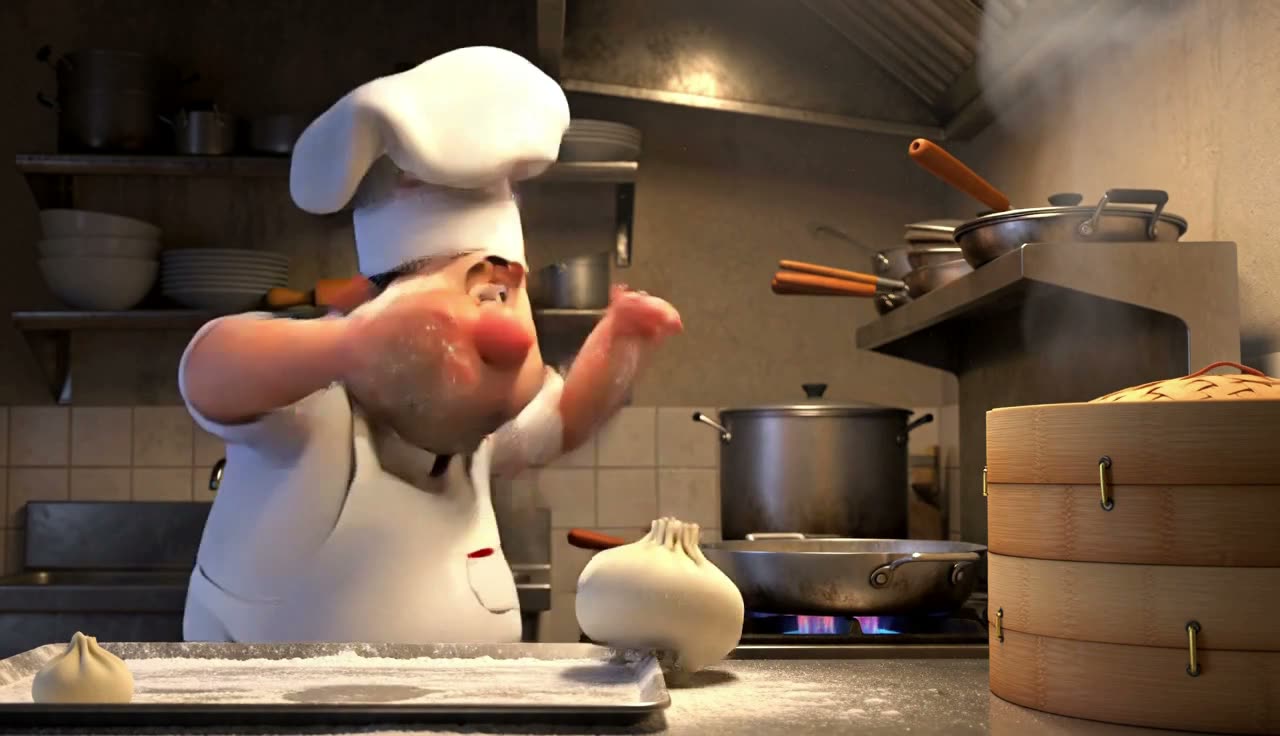
Pika 在 MiniMax H3 上后训练的 LoRA,6 步出带声音的视频。在一张 RTX 4080 上的 ComfyUI 里,同提示词、同种子和原版 20 步比了 4 组:官方示例的卡通包子,加三个自写的 8 秒剧本(写实办公室对白、古装公堂、黏土定格)。8 秒一条 328 秒对 1009 秒,台词一字不差,画面更清楚;只有黏土那组被做成了精致 3D。

Pika's post-trained LoRA for MiniMax H3 makes video with sound in 6 steps. On one RTX 4080 in ComfyUI, with the same prompts and seeds as the stock 20-step run, four pairs: the official cartoon-dumpling example plus three original 8-second scripts (a realistic office dialogue, a period courtroom, and clay stop-motion). An 8-second clip took 328 s instead of 1009 s, every spoken line came out right and the picture was sharper; only the clay one turned into polished 3D. The page is in Chinese.

Pika H3 Flex FL2VA LoRA (Comfy-Org bf16)MiniMax-H3 FL2VA (pruned int8)ComfyUI 0.39mlx-whisper large-v3-turbo

要点Notes
  • 两边每步耗时一样(8 秒约 49 秒一步),快全靠步数少:三条 8 秒 Flex 327~330 秒,原版 1008~1011 秒。Each step takes the same time on both (about 49 s at 8 seconds); the speed-up comes entirely from fewer steps: 327–330 s for Flex vs 1008–1011 s for the base on the three 8-second clips.
  • 两组对白共 6 句,Whisper 转写两边都一字不差(只有一个同音字是转写的问题),切点都在提示词写的时间 ±0.25 秒内。Across 6 dialogue lines in two scripts, Whisper transcripts matched the script on both sides (one homophone was a transcription slip), and the cuts landed within ±0.25 s of the prompted time.
  • 黏土定格那组原版是哑光的手捏黏土,Flex 做成了光滑的 3D 微缩模型,手作感没了;清晰度指标高在这里不是好事。In the clay stop-motion pair the base looks like matte hand-pressed clay, while Flex renders smooth 3D miniatures and the handmade feel is gone. A higher sharpness score isn't a win here.
  • 4 组里有 3 组两边构图、走位大体一致,可以先用 Flex 试种子,挑中了再跑原版,但不保证一致。In 3 of the 4 pairs both runs share roughly the same framing and blocking, so Flex can scout seeds before a full base run, though that isn't guaranteed.
  • 用的是 Comfy-Org 重打包的 bf16 LoRA 加官方剪枝 int8 底模;Pika 说 ComfyUI 端到端出片没验证过,结果可能和官方推理包不一样。This uses Comfy-Org's bf16 repack of the LoRA with the official pruned int8 base. Pika says end-to-end ComfyUI output hasn't been validated and may differ from their own inference package.
打开 demoOpen demo

语音合成Speech synthesisTTS 对比TTS comparison盲听Blind test交互Interactive

Drama 3 对 IndexTTS 2.5:开口快十倍,情绪更到位Drama 3 vs IndexTTS 2.5 — speaks 10× sooner, with better emotion

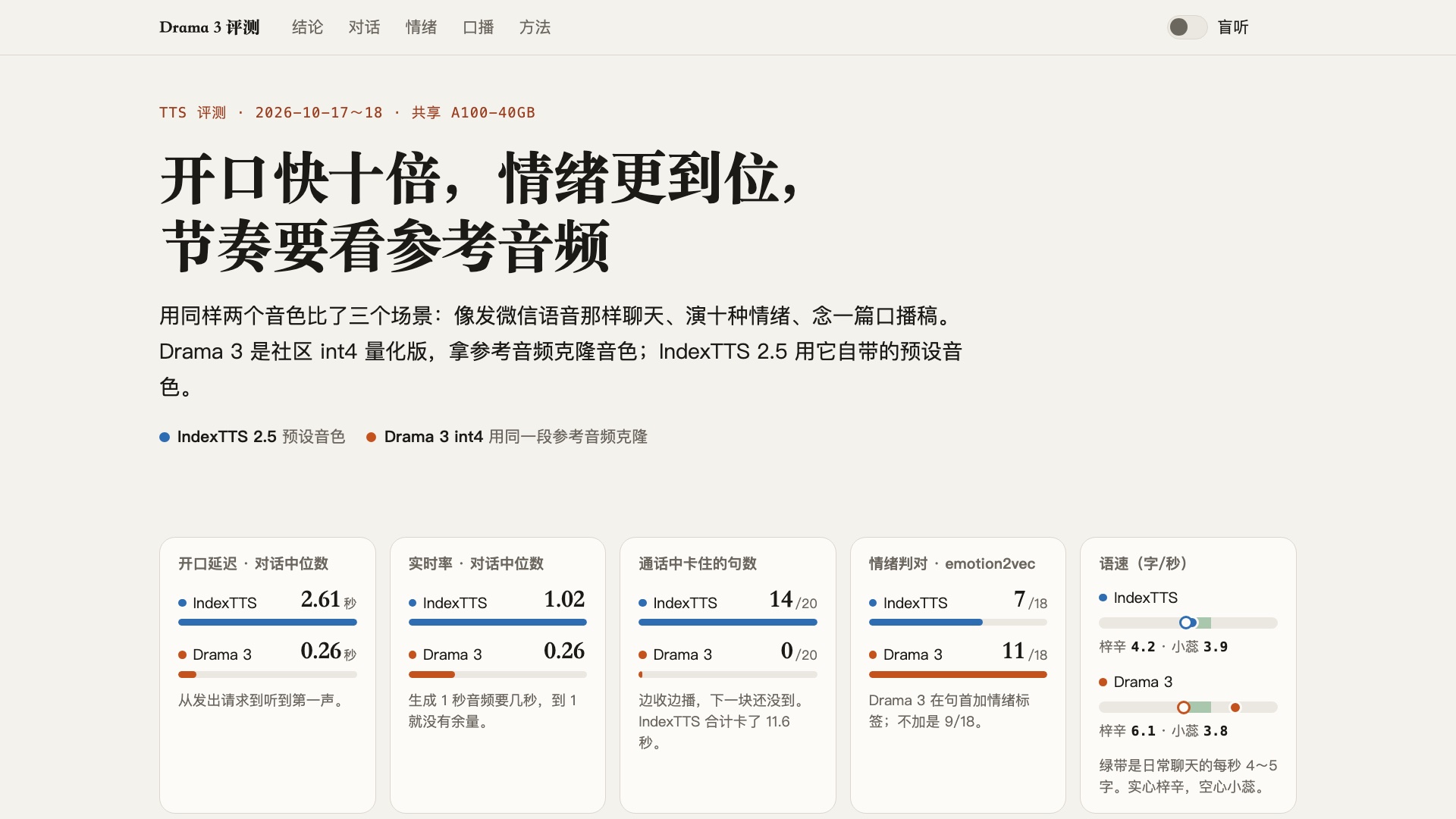
Fish Audio 新开源的 Drama 3 和 IndexTTS 2.5,用同样两个音色比了三个场景:像发微信语音那样聊天、演十种情绪、念一篇口播稿。Drama 3 用社区 int4 量化版跑在 40GB 的 A100 上,开口中位数 0.26 秒,IndexTTS 要 2.6 秒。两段语音电话能按真实延迟回放,所有 A/B 都能开盲听。

Fish Audio's newly open-sourced Drama 3 against IndexTTS 2.5, same two voices, three scenes: chatty WeChat-style voice messages, ten emotions, and a narration script. Drama 3 runs as the community int4 quant on a 40GB A100 and starts speaking in 0.26 s (median) versus 2.6 s for IndexTTS. Two voice calls replay with their real latency, and every A/B pair can be blind-tested. The page is in Chinese.

Drama 3 int4 (fishaudio/drama-3-int4)IndexTTS 2.5SGLang-Omni 0.1.8Whisper turboemotion2vec_plus_large

要点Notes
  • 打电话:IndexTTS 生成和播放差不多快(实时率 1.02),模拟通话里 20 句有 14 句播到一半要停下来等;Drama 3 实时率 0.26,一句没卡。On calls: IndexTTS generates about as fast as it plays (RTF 1.02), so 14 of 20 lines stalled mid-playback; Drama 3 runs at RTF 0.26 and never stalled.
  • 情绪:句首加 [sad]、[angry] 这类标签,emotion2vec 判对 11/18,不加 9/18,IndexTTS 的情绪向量 7/18;厌恶谁都没做出来。Emotion: with tags like [sad] or [angry] up front, emotion2vec agreed on 11/18, 9/18 without tags, and 7/18 for IndexTTS emotion vectors. Nobody managed disgust.
  • Drama 3 的语速跟着参考音频走:2.4 秒的快语速参考让它每秒说 6 个字,听着像在赶;IndexTTS 两个音色都稳在每秒 4 字左右。Drama 3 copies the pace of its reference clip: a fast 2.4-second reference made it speak about 6 characters a second, which sounds rushed; IndexTTS stays near 4 for both voices.
  • int4 版在 A100-40GB 上占约 28GB 显存;为了塞进去关掉了预填充 CUDA graph,4 路并发时每路开口涨到 2.6–2.7 秒。The int4 build takes about 28GB on an A100-40GB. Fitting it meant turning off prefill CUDA graphs, and with 4 concurrent requests each one took 2.6–2.7 s to start.
  • SGLang-Omni 0.1.8 还不支持多角色和续写式编辑,模型卡上这两项暂时用不了。SGLang-Omni 0.1.8 doesn't support multi-speaker or continuation editing yet, so those two model-card features aren't usable for now.
打开 demoOpen demo

视频生成Video generation环绕视频Orbit video抠像Matting交互Interactive

天台起舞:她一直在跳,拖着转整个天台Rooftop Dance — spin the scene while she keeps dancing

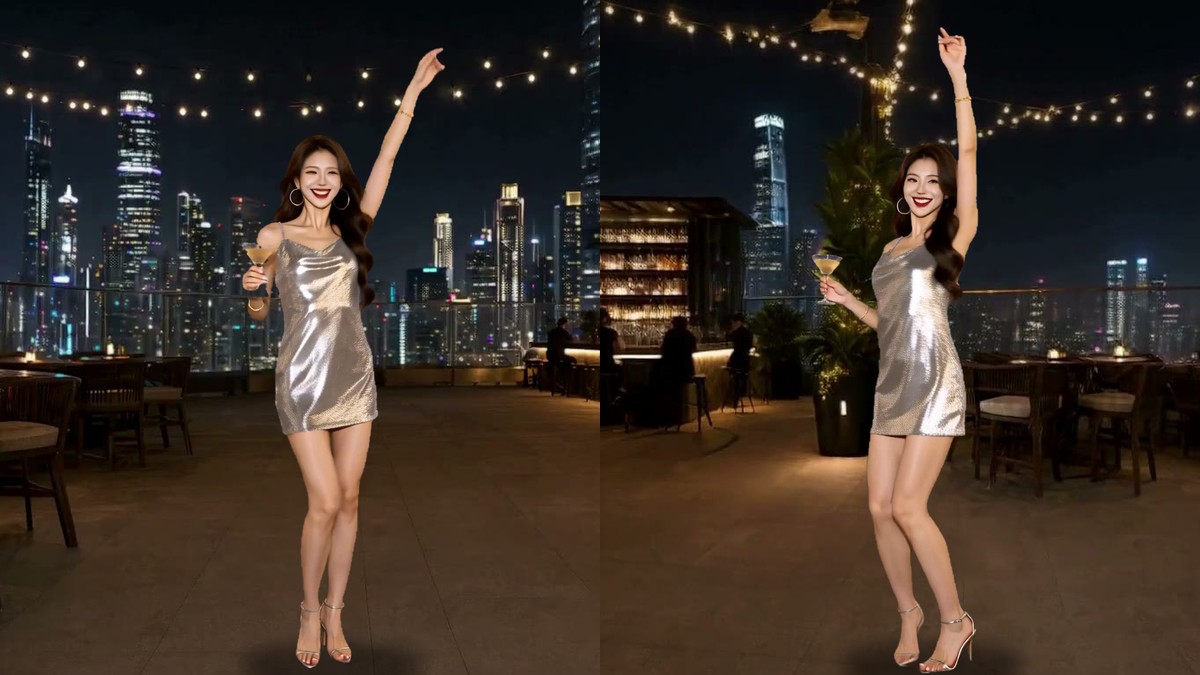
接着《朋友圈》第 4 格:苏曼在天台派对上一直在跳舞,拖动画面,整个天台绕着她转。背景和人分开生成——空天台用 MiniMax-H3 + ORB360 LoRA 绕一圈,跳舞用 H3 首尾帧出一段能无缝循环的 5 秒视频,再用 SAM 3.1 抠出来叠在中间,音乐也是 H3 一起生成的。

A follow-up to panel 4 of The Feed: she keeps dancing at the rooftop party while you drag to spin the whole rooftop around her. The background and the dancer are made separately — an empty-rooftop orbit from MiniMax-H3 + the ORB360 LoRA, and a seamlessly looping 5-second dance from H3 first/last-frame video, cut out with SAM 3.1 and layered in the middle. The music comes from H3 too.

Qwen Image 2.1MiniMax-H3 FL2V (8-step turbo)MiniMax-H3 Ref2VAORB360 LoRA (step 1500)SAM 3.1

要点Notes
  • 两层分开,所以她永远正面朝你:拖动转的是背景,镜头不会绕到她背后。Two separate layers, so she always faces you: dragging spins the background, and the camera never goes around behind her.
  • 让 ORB360 绕一块空地转:2 个种子里 1 个真的绕了一圈、首尾接得上;另一个把整个画面原地翻滚,城市都倒过来了。Asking ORB360 to orbit an empty spot: one of two seeds circled properly and looped cleanly; the other rolled the whole frame, skyline upside down.
  • 人糊是因为太小:1024×768 里她的脸只有约 76 像素,一跳就糊成蜡像;整张图提到 1536×1152 后,同样的显示尺寸下脸部清晰度约是原来的 3 倍。The blur came from size: at 1024×768 her face was about 76 px and smeared as soon as she moved; at 1536×1152 the face is about 3× sharper at the same display size.
  • 想裁成竖构图让她更大,结果 5 次全都推镜头(推近 1.09–1.6 倍),提示词写了不准推也没用;横构图 4 次都纹丝不动。Cropping to a tall portrait to make her bigger backfired: all 5 runs pushed in (1.09–1.6×), even with a no-zoom prompt; all 4 landscape runs held perfectly still.
  • SAM 3.1 按 woman 抠人不带她手里的酒杯,要再按 cocktail glass 抠一次补上。SAM 3.1’s “woman” mask leaves out the cocktail glass in her hand; a second “cocktail glass” pass fills it in.
打开 demoOpen demo

图像生成Image generation人物一致性Character consistency环绕视频Orbit video交互Interactive

朋友圈:一页可以转的漫画The Feed — a comic page you can spin

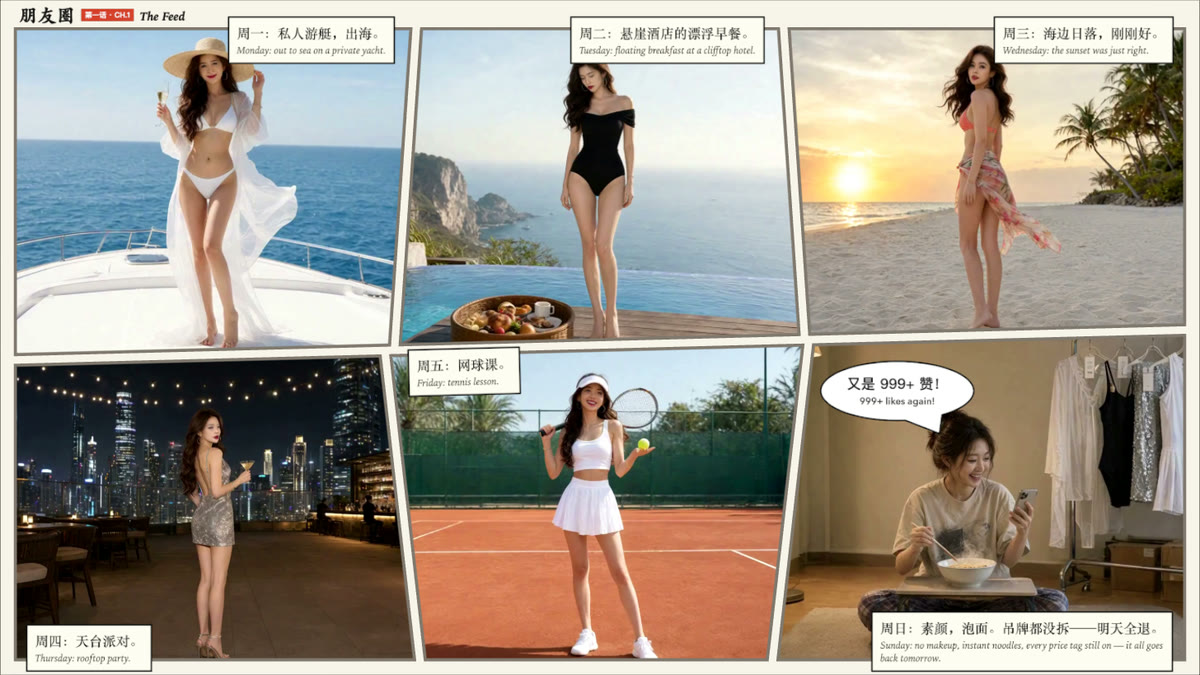
Qwen Image 2.1 画同一位名媛一周的朋友圈:六套夏日和度假造型,换了衣服,脸、卷发、泪痣、首饰都对得上;每格再用 MiniMax-H3 + ORB360 LoRA 生成 360° 环绕视频,拼成一页可以拖着转的漫画。周日那格衣架上的吊牌可以点。

A socialite’s week on her feed, drawn with Qwen Image 2.1: six summer and resort outfits, and her face, hair, beauty mark and jewelry hold steady through every change. Each panel becomes a 360° orbit with MiniMax-H3 + the ORB360 LoRA — drag to spin, and click the clothes rack on Sunday.

Qwen Image 2.1MiniMax-H3 Ref2VAORB360 LoRA (step 1500)three.js

要点Notes
  • 换装不换人:六套衣服、白天黑夜、浓妆素颜,脸、栗色卷发、右眼下的泪痣和金耳环都对得上。Outfits change, she doesn’t: six looks, day and night, full makeup and none — same face, chestnut waves, beauty mark and gold hoops.
  • 环绕时皮肤、薄纱、亮片都稳,背面补得合理:游艇补出船舱,悬崖泳池补出别墅,天台补出酒吧。Skin, sheer fabric and sequins hold up through the orbit, and the back views make sense: a yacht cabin, cliffside villas, a rooftop bar.
  • 大片平地是弱点:网球场 4 次里 3 次镜头升到头顶、画面翻倒,加“镜头保持水平”的提示词也救不回来,只能换种子;坐在地毯上那格加了这句就好了。Big flat ground is the weak spot: on the clay court the camera rose overhead and flipped in 3 of 4 runs, and a “keep the camera level” prompt didn’t save it — only a new seed did. The same line did fix the panel where she sits on a rug.
  • 身边的道具会被“粘”在人身上:漂浮早餐篮在一个种子里转到侧面就跑到她脚下,像站在篮子里;换个种子,篮子才老老实实留在甲板上。Props near the subject can get glued to her: in one seed the floating breakfast tray slid under her feet as the camera came around, as if she were standing in it; another seed kept it on the deck.
打开 demoOpen demo

图像生成Image generation环绕视频Orbit video交互Interactive

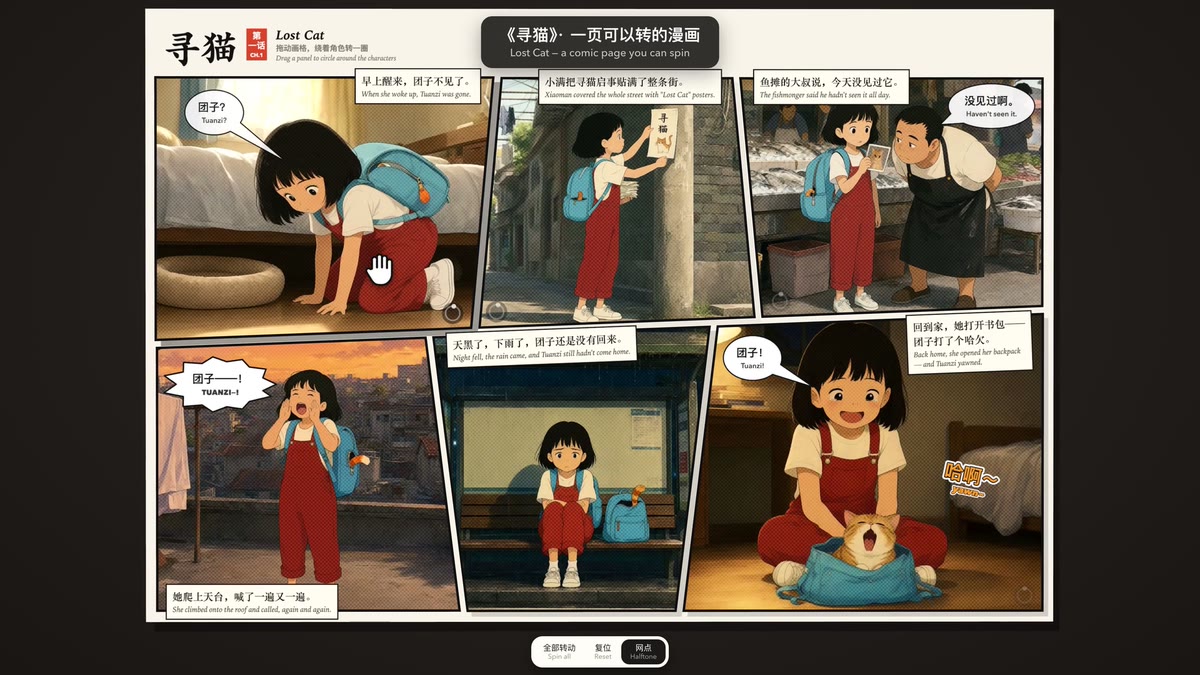
寻猫:一页可以转的漫画Lost Cat — a comic page you can spin

Qwen Image 2.1 画六格剧情漫画,每格用 MiniMax-H3 + ORB360 LoRA 生成 360° 环绕视频,再用 three.js 拼成一页:拖动任意一格就能绕着角色转,点一格推近看,第二格的寻猫启事还藏了彩蛋。

Six comic panels drawn with Qwen Image 2.1, each turned into a 360° orbit video with MiniMax-H3 + the ORB360 LoRA, then assembled into one three.js page: drag any panel to circle the characters, click to zoom in — and try the Lost Cat poster in panel 2.

Qwen Image 2.1MiniMax-H3 Ref2VAORB360 LoRA (step 1500)three.js

要点Notes
  • 每一格的环绕都成立:转一圈回到原图,背面补得合理,角色前后一致,双人格也能一起转。Every orbit closes the loop: plausible back views, consistent characters, even two people turning together.
  • 官方提示词会把室内背景补成户外(草地、雪);给每格写清 360° 环境后,卧室和菜市场都修好了。The stock prompt turns indoor scenes into outdoor ones (grass, snow); describing each panel’s surroundings fixed the bedroom and the market.
  • 提示词改不了图里已有的遮挡:主角背后贴着墙或广告牌,转到背面就看不到人,出图时要给背后留空。Prompts can’t remove occluders already in the image — leave space behind the subject when drawing the panel.